> For the complete documentation index, see [llms.txt](https://docs.klai.studio/llms.txt). Markdown versions of documentation pages are available by appending `.md` to page URLs; this page is available as [Markdown](https://docs.klai.studio/cookbook-backlog/backward-compatibility-v2-to-v3.md).
# Backward Compatibility for V2 to V3
Notes for restoring legacy behaviors when upgrading older BetterForms V2 projects to V3.
This page collects temporary compatibility notes for projects being upgraded from BetterForms V2 to V3.
These notes are not general BetterForms setup guidance. If you are building a new V3 app, you usually do not need these steps.
## Legacy Bootstrap Glyphicons
BetterForms V3 no longer bundles the old Bootstrap glyphicon font assets by default. This reduces shipped legacy assets in the default app bundle while keeping a simple compatibility path for upgraded projects that still need them.
This is usually fine because:
* BetterForms core UI uses Font Awesome
* most new V3 apps do not rely on `glyphicon` classes
If your older V2 project still has custom HTML that uses legacy Bootstrap 3 icons such as:
```html
```
you can restore that support in the site's **DOM Header Insertions** area.
Add this to **Load First**:
```html
```
## Legacy Helper File Magic-Link Notifier Update
If you are upgrading an older V2 project that still uses the legacy helper-file `onAuthNotifier` script logic, passwordless magic-link sign-in needs one additional FileMaker branch.
Older helper setups often already handle:
* `sendResetPwd`
* `resendVerifySignup`
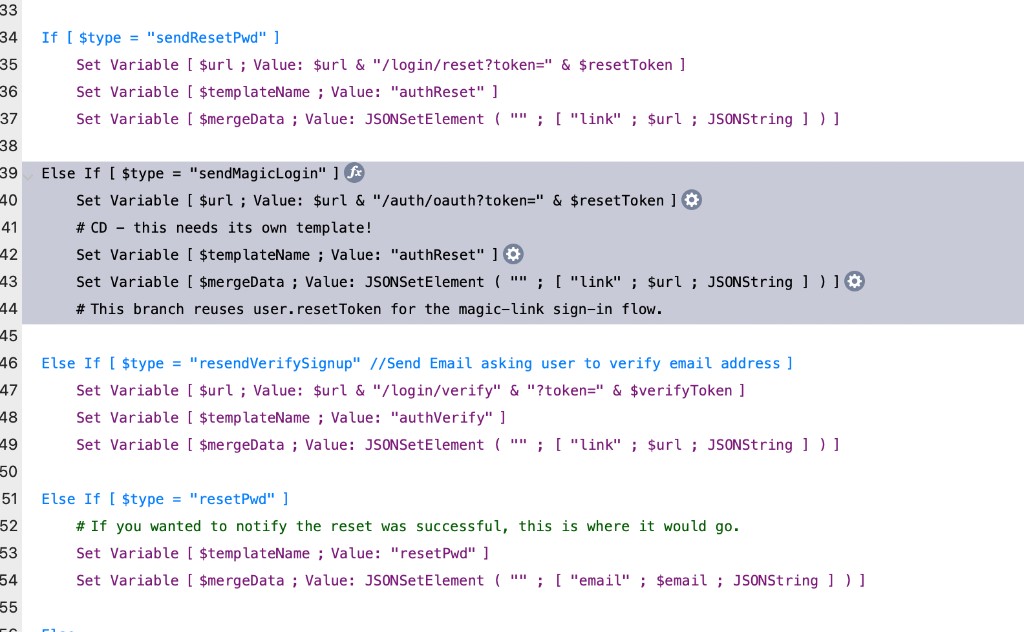
To support the newer `authMagicRequest` flow, add a `sendMagicLogin` branch in the same area as your existing reset-email logic.
This branch should:
* build a link using `user.resetToken`
* point the link at `/auth/oauth?token=...`
* populate the merge data passed to your email template
Example FileMaker script block:
```
Else If [ $type = "sendMagicLogin" ]
Set Variable [ $url ; Value: $url & "/auth/oauth?token=" & $resetToken ]
# This needs its own template in older helper setups.
Set Variable [ $templateName ; Value: "authReset" ]
Set Variable [ $mergeData ; Value: JSONSetElement ( "" ; [ "link" ; $url ; JSONString ] ) ]
# This branch reuses user.resetToken for the magic-link sign-in flow.
End If
```
Example from an older helper-based notifier script:
Add this alongside the existing auth notifier branches, for example between `sendResetPwd` and `resendVerifySignup` if that matches your current script.
If your helper already sends reset emails successfully, you usually do not need new token fields for magic links. The newer magic-link flow reuses the same helper token values as password reset.
## When To Use This
Use this only when:
* you are upgrading an older V2 project to V3
* your project still contains legacy custom HTML that references `glyphicon` classes
* your project uses an older helper-file auth notifier script that predates `sendMagicLogin`
Do not add this just because a project uses Bootstrap layouts. This is specifically for legacy icon class support.
## Notes
* CDN-loaded assets should be placed in **DOM Header Insertions - Load First**
* if the project no longer uses `glyphicon` classes, do not add this
* if you later replace those icons with Font Awesome or custom SVG icons, you can remove this compatibility link
* for legacy helper auth flows, update the FileMaker `onAuthNotifier` script before enabling magic-link login in the app