
Appearance
Klai Server Proxy
Overview
The Klai Proxy can be used to provide a single known IP address to access a given database server. This allows IT professionals to tightly configure access control to their internal network. The current proxy IP is located in North America.
PROS
Dev Ops technicians can whitelist only one IP address from the Klai Studio Cloud servers.
CONS
Some latency is added depending on your geographic location, this is generally small.
Specifications
Fixed IP Address is: 54.215.158.200
Port: 443
Proxy location: AWS Data Center in Northern California. US-WEST-1
Configuring
In the Klai editor, add a server and check Use Klai Proxy. Host Address is the FileMaker server’s own IP address or domain name.
The checkbox routes that server through the Klai proxy. Traffic to your FileMaker server then comes from the fixed proxy IP above, so the firewall only needs to allow that address.
- Open Add Server.
- Enter a Server Name.
- Enter the FileMaker server’s IP address or domain name in Host Address. The field already includes the
https://prefix. - Choose the gateway: XML or DAPI.
- Check Use Klai Proxy.
- Click Create Connection.
Ask your network team to allow inbound HTTPS from 54.215.158.200 on port 443.
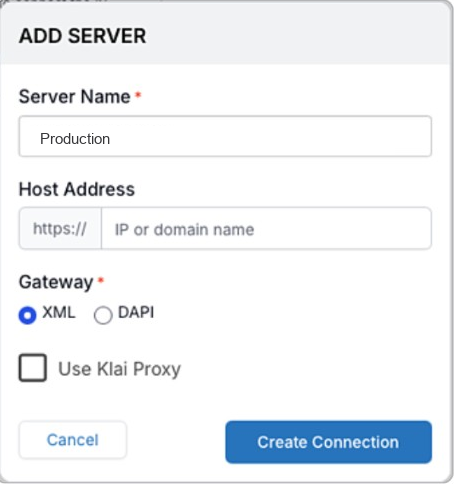
Servers that were pointed at the proxy by pasting the proxy URL into Host Address can be switched over the same way: use the FileMaker server’s own host, and check Use Klai Proxy.
Testing Connection
To confirm the proxy can reach your FileMaker server, open this URL in a browser. Replace YOUR.SERVER.DOMAIN with the server’s domain name:
https://4yt4c3i6n7tndqe6732fsbgxhq0gsaim.lambda-url.us-west-1.on.aws/YOUR.SERVER.DOMAIN
This URL is only for that check. In the editor, keep the real host in Host Address and use the Use Klai Proxy checkbox.
If the proxy is working, you should reach the same kind of response page your FileMaker server would normally return for a direct browser request.
If it does not work, check:
- the server domain name is correct
- your FileMaker server is reachable on the expected web endpoint
- your network rules allow the published proxy IP
- the domain is included at the end of the proxy URL
Example response:
html
<!DOCTYPE HTML PUBLIC "-//W3C//DTD HTML 4.01 //EN" "http://www.w3.org/TR/html4/loose.dtd">
<html>
<head>
    <title>FileMaker Website</title>
        <style type="text/css">
        .centered {
             display: block;
             margin-left: auto;
             margin-right: auto;
             text-align: center;
             vertical-align: middle;
        }
        </style>
        <link rel="icon" type="image/x-icon" href="/favicon.ico" />
</head>

<body>
    <h1  class="centered" >FileMaker Database Server Website</h1>

    <img class="centered" src="TestPage.png" alt="Claris International Inc." />
</body>

</html>