
Appearance
Setting up Auth0
Auth0 is one of the OAuth providers supported by BetterForms.
Before using this guide, make sure you have already set up the shared BetterForms OAuth requirements in the canonical reference:
That page covers the BetterForms-side flow, required callback page, authLoginOauth, Users.oauthId, and onBeforeRegistration.
What Is Auth0-Specific
For Auth0, the main provider-specific pieces are:
- Create an Auth0 application of type
Regular Web Application - Add the BetterForms callback URL to the application
- Copy the Auth0 credentials into BetterForms
- Optionally enable Auth0 database or social connections for the login methods you want
Create the Auth0 Application
In Auth0, create or open the application that will be used for BetterForms and choose:
- Application type:
Regular Web Application
Allowed Callback URLs
In the Auth0 application settings, add:
text
https://yourapp.domain.com/oauth/auth0/callbackIf the same BetterForms app is reachable on multiple domains, add each callback URL as a comma-separated entry in Auth0.
Credentials to Copy Into Klai Studio
BetterForms expects the Auth0 provider credentials for the app or tenant:
In BetterForms, open the app environment menu, choose App Settings, and then go to the authentication settings for the app:
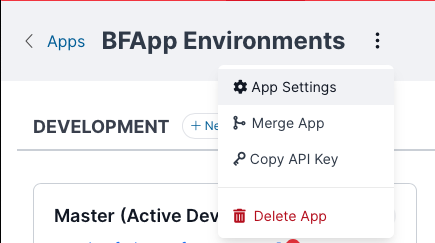
The Auth0 provider fields in BetterForms look like this:
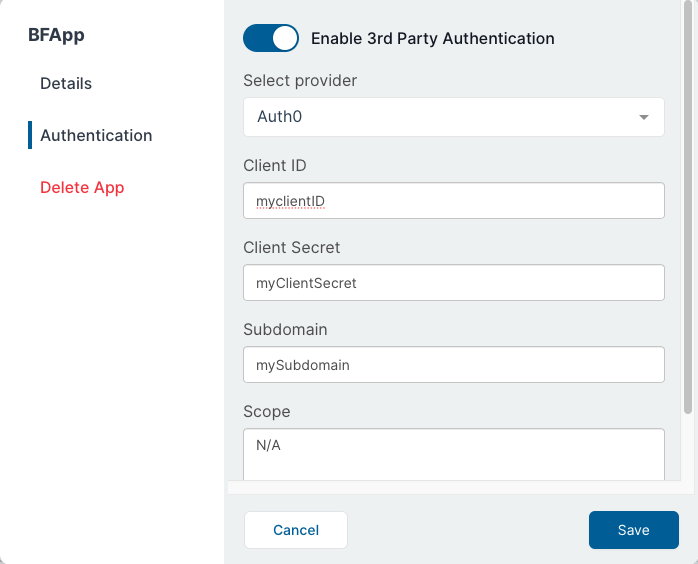
- Client ID
- Client Secret
- Subdomain
For the Subdomain field, use only the Auth0 subdomain portion, not the full URL.
Example:
- Auth0 domain:
yourtenant.us.auth0.com - BetterForms subdomain value:
yourtenant.us
Auth0 Login Options
Auth0 can present different login methods depending on what you enable in Auth0:
- Auth0 database connection for username/password login
- Social or enterprise connections for external identity providers
Those choices are managed in Auth0. BetterForms still completes the sign-in through the same OAuth callback flow.
Allowing New Users
If OAuth users should be allowed to create BetterForms users automatically, your FileMaker integration must support the onBeforeRegistration hook and return model.createUser = true when registration should proceed.
This is the FileMaker-side hook location commonly used for that setup:
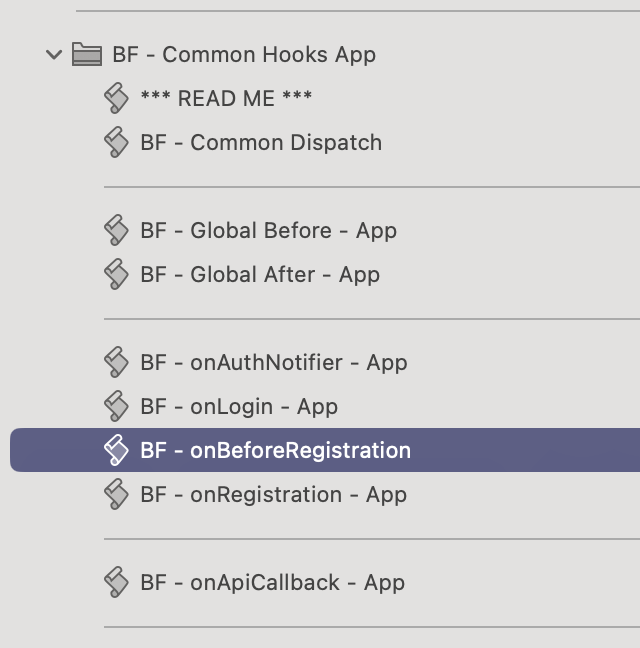
If that hook is missing, or if it does not allow the user, BetterForms will not create the new account.
Optional: Force a Full Auth0 Logout
authLogout clears the BetterForms session. If you also need to clear the Auth0-hosted session, redirect the browser to Auth0's logout endpoint after authLogout.
json
"logout": [
  {
    "action": "authLogout"
  },
  {
    "action": "path",
    "function": "action.options.url = `https://yourtenant.us.auth0.com/v2/logout?client_id=YOUR_CLIENT_ID&returnTo=https://${window.location.host}`",
    "options": {
      "sameWindow": true,
      "url": "/"
    }
  }
]
Replace:
yourtenant.us.auth0.comwith your Auth0 tenant domainYOUR_CLIENT_IDwith the Auth0 application client ID